For 15 years, I hopped AWS accounts annually to keep my websites on EC2’s free tier. When Amazon finally closed that loophole last year, I decided to let Claude Code handle the migration, unsupervised. The EC2 micro free tier where I kept some personal websites and git repos were free for one year, ‘renewable’, as long as I created a new account and migrated everything over. This was a well known loophole, and Amazon seemed to give this tacit approval until last year. They now charge about $20/mo for the micro instance that hosts a couple of my personal websites and git repos. After paying a few months I decided to see if claude code could migrate this for me.
AWS yearly account creation/hopping was a bit of a pain, because it was enough time to forget what to do, and for the process and interface to change enough to make following my notes difficult. On the other hand, it was good for keeping me updated on AWS tooling that I wouldn’t have otherwise used. 15 years ago, it was economically worth it when I was broke, but it became an annual ritual that persisted after I had less financial incentive to do the work. I usually budgeted 2-8 hours for this process. But there was one time it took a couple days because I wanted to update the linux distro. Other than that, the steps were mostly common: make a snapshot of the disk, create an AMI image, share permissions with a newly created account, update DNS, restore security groups, verify I still had access, etc. I found this post for 2012 in my bookmarks (blogger.com!) that describes some of this. Things became easier each year, with the ability to create AMIs faster and share security groups, but it always felt like following a cookie recipe where you aren’t sure if you forgot something like salt or baking soda.
I’ve been using the various AI coding tools but never experimented with YOLO-like modes that don’t pause to ask for permission because of reasonable fear that it would do something crazy like ‘sudo rm -rf /’ (which happened to others before, and is apparently still happening with Gemini 3 Pro). Something about the idea of migrating of EC2 seemed heavy handed enough that I was willing to try it on an isolated server anyway. I also think that seeing Claude Code creator Boris Cherny post how he uses agents including running overnight also made me a bit more open to this idea, although he explicitly mentions not using –dangerously-skip-permissions.
Setup
A year ago I installed Ubuntu on a 2013 macbook air (with this guide) and have been using that for my vibecoded sites, including longevitypapers.com and bonusprofessor.com. I don’t do any personal browsing on that macbook or use it for anything else, so aside from the code which is backed up and my API tokens there is not a lot to lose. Still, I was hesitant to run yolo mode on claude since the websites were static pushing to cloudflare. So I put CC on the macbook with –dangerously-skip-permissions. Boris Cherny said he does things without needing the flag via allowlists but my experience has been there still 5-20 questions and permission requests claude has per hour. I’m probably doing something different or wrong here, and would like to dig more into this in the future.
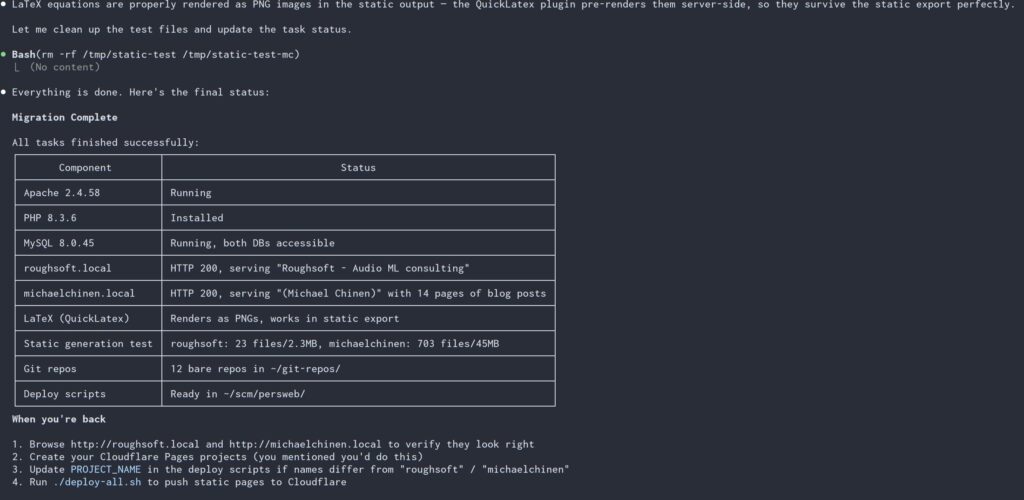
I manually rsync’d the entire contents of my AWS EC2 disk to the macbook and then told Claude to migrate this to a local WordPress instance that I can still login to and edit, and have a worker script that pushes a static version of the site to cloudflare pages where no login is required or database exists. This model works for me because it is more secure and I don’t require persisted user input. 99.99% of comments in the last years are spam (also because no one reads my site, and if someone does and really wants to talk about it, they can discuss it on HN or reddit). I told CC that I expected it to produce the site without interaction, saving questions and TODOs for me. It had about 10 back and forth questions in 20 minutes and one script that needed sudo for to get started (installing apache, etc). Then I went to a nice dinner 30 minutes from home.
Result
When I came back, it had set up wordpress for me at a .local address that I could access from my LAN and login to create this post I was surprised that it was able to get here without questions or requiring sudo after the install script which I manually ran for it. Instead of creating the cloudflare pages myself, I gave it an API key and asked it to set things up. The static render seems to be working via a plugin, but needed two more prompts to keep the CSS styling and link following. It provided a deploy.sh script I can run to render and push the static site to cloudflare when I make updates to the blog. Claude also handled the DNS swap, which I gave it a DNS zone edit token for the domains in question for.
The git repos are older signal processing projects, iOS and android apps that I don’t really care much about anymore. But it looks like these are available with the same gitosis/gitolite setup that I haven’t tested yet. In any case I can access the source on my local server and clone anywhere on my LAN which is good enough for me.
Overall, I’m very happy with the result. I don’t know if this static-render of WP is very popular, but I loved it for my other hobby sites I put on Cloudflare already, and it’s even better with WordPress. It allows for a free staging area while editing locally in the WP WYSIWYG editor, while removing virtually all of the WP attack surface since the site the public will browse has no database attached.
Other thoughts
By far the longest and hardest part of this process was documenting it in this post. I’ve seen so many comments about how boring it is to hear how someone uses AI, but this was at least interesting in a write-only way and has updated my model a bit. The scary security concerns are still there, and I’m sure some security-minded folks would balk at the idea of giving this level of access to the agent. I was fine with this because the server in question had very little that I would mind if it was destroyed, and I was fairly confident it would not share it with the world or try to do something malicious like install a root kit or try to hack other computers on my LAN.
The real thing that scares me is because it is able to do these time consuming tasks on it’s own now, it’s increasingly more attractive to use it on larger projects, which will need more sandboxing and security concerns that are going to be very easy to overlook. The fact that I did this experiment probably shows in some ironic way that my security mindset is not as good as it needs to be for this kind of experiment. I might not get burned, but that will be because of luck. I suppose it will be good to reflect on this. But in the meantime, I’ll enjoy the new server, and I think I’ll continue to use it in a safer mode unless the right conditions come along to allow running unsupervised again.